Urdu and ABC handwriting practice
See the stroke paths and try a few letters in the free browser tracing demo.
KidSpin is a free Android learning app for children aged 3 to 7, in English and Urdu. It teaches English ABC with phonics and finger tracing, 123 and simple maths, all 39 Urdu letters, namaz with pictures, the six kalmas and daily duas. Today's Path gives your child three short steps a day. There are no ads and no login, and learning progress stays on the phone.
Not on Android? Print free tracing worksheets (Urdu, ABC and 123) or try the tracing game in your browser.

| What it is | A preschool learning app for Android (Google Play), in English and Urdu |
|---|---|
| Ages | 3 to 7: playgroup, nursery, pre-K and kindergarten |
| Free content | 14 learning modules, 16 story books, seven games, Echo the talk-back friend, and Today's Path (three short steps a day) |
| Urdu | All 39 Urdu qaida letters with finger tracing, numbers 1 to 50 (Urdu ginti), and an Urdu switch on every card |
| Islamic basics | Namaz picture cards from wudu to salam, the six kalmas and daily duas with meanings. Parents can hide them. |
| Price | Free with no ads. Optional Bonus Pack of 10 modules: $2.99 once on Google Play (Rs 299 in Pakistan). Family gift code on the web: $4.99 once, up to 5 devices. No subscription. |
| Account and data | No login. Learning progress and Echo recordings stay on the phone. |
| Free extras | Printable tracing worksheets (5 PDF packs) and a browser tracing game |
| Made by | Asad Mahmood, a software engineer and parent in Lahore, Pakistan |
| Latest version | 1.0.5 (sibling profiles, daily time limit, progress report, bedtime Listen mode) has been available on Google Play since 14 October 2026. Release notes |
Pakistani families get Urdu and English together: the qaida from alif to yay, English ABC, and Urdu picture stories like The Thirsty Crow.
Muslim families anywhere (UK, US, Canada, the Gulf, Malaysia) get the basics a 4-year-old can actually follow: wudu and every namaz position with pictures, the six kalmas with meaning, and short duas for eating, sleeping and travel.
Any family can switch the faith modules off. What's left is a calm, ad-free preschool app: phonics, tracing, counting, animals, colours, shapes and stories.
This is the real setting from the app: Settings → Choose what your child sees. It sits behind a grown-up maths question.
14 free modules visible
Plus in every setup: 16 story books, Calm Time, Echo and seven games.
Real screens from version 1.0.3, in the order a child meets them. Scroll sideways to follow a session.
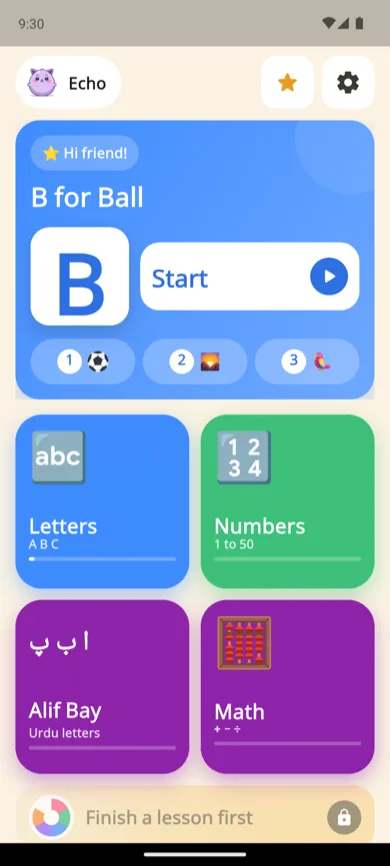
One letter or number, one manners or faith lesson, one fun topic. The next letter unlocks only when this one is learned.
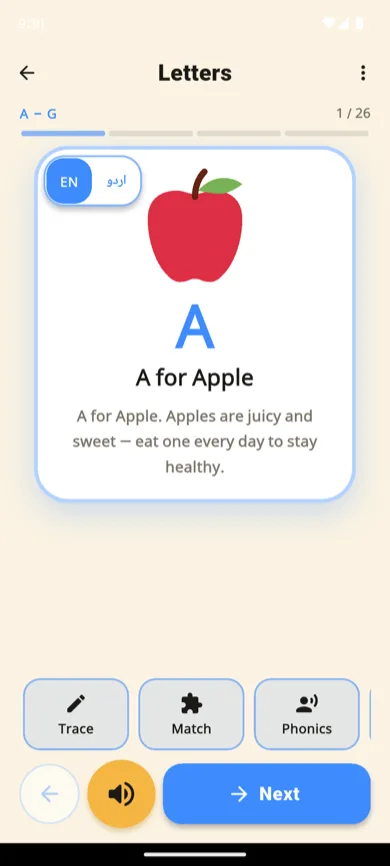
A for Apple, read aloud. One switch flips the same card to Urdu.
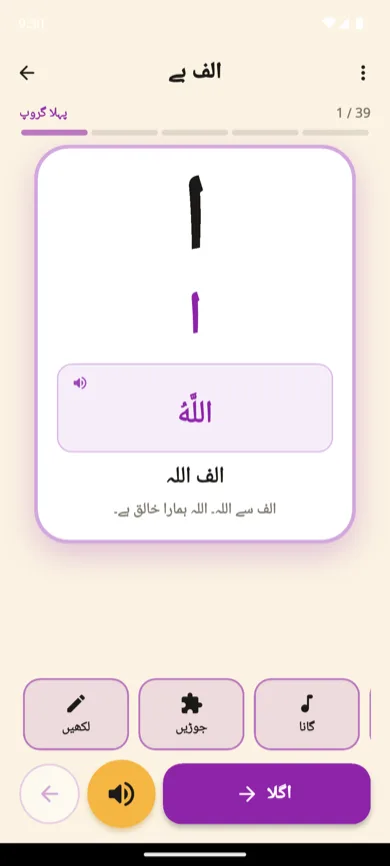
All 39 letters in qaida order, each with a picture word and a short sentence.
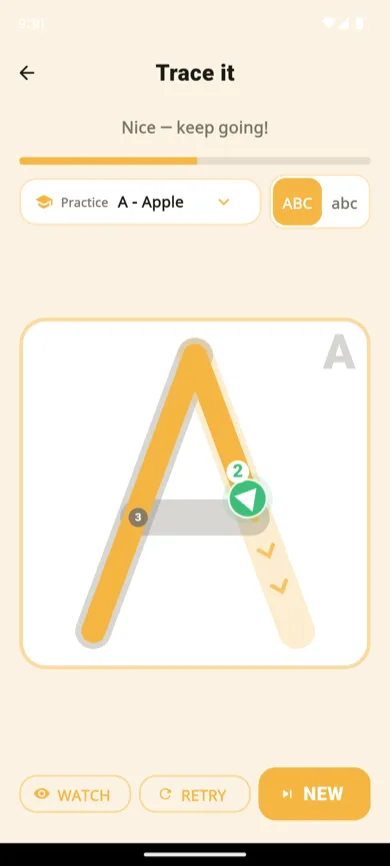
Numbered start dots and arrows teach real stroke order, in English and Urdu. Scribbling doesn't count.
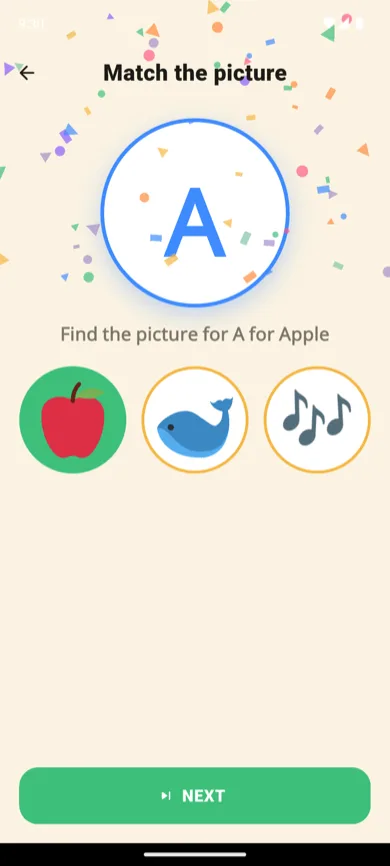
Picture match, counting, colours, animal swipe and phonics blending all quiz the lesson just learned.

V-A-N becomes "van". Phonics blending is how reading starts, not just letter names.
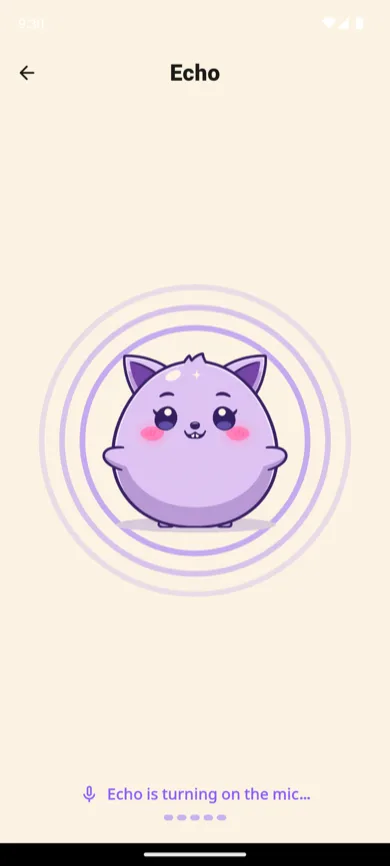
Your child says anything, in any language, and Echo repeats the sound in a funny voice. The recording stays on the phone and is deleted after it plays. How Echo works.
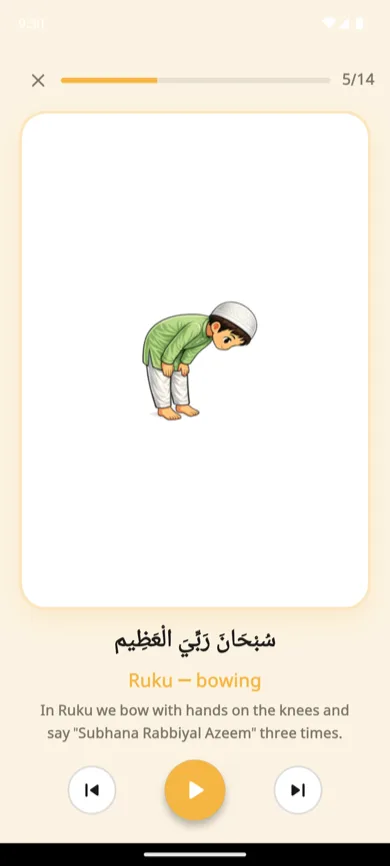
Illustrated wudu and Hanafi-guided prayer positions, with selected Arabic phrase excerpts and short explanations. Practise with a parent or teacher.

16 short comic books in English and Urdu. Each panel lights up as its line is read.

Pick which modules your child sees, set their age, and keep purchases behind a grown-up question.
Try the tracing game in your browserRead the full parent guide
Here is how the app handles ads, voices, learning progress and parent controls. Read the privacy policy for network and service-provider details.
KidSpin has no advertising SDK in it at all. Nothing pops up mid-lesson, and no ad network ever sees your child.
Learning progress and Echo recordings stay on the phone. Purchases, restores and optional license checks use internet; crash reporting may send diagnostics if enabled in the installed version. Safety details.
Lessons, games and stories are inside the app. Offline speech needs an installed offline voice for the language you choose; voice quality varies by phone.
The app is free. The Bonus Pack is bought once and kept. Nothing renews.
Today's Path offers three short activities. In the current version a sticker records a finished activity. From KidSpin 1.0.5 a sticker needs a correct answer to a small check. That is a practice signal, not a test or certificate.
Big buttons, one idea per screen, and phone voices help children explore. A parent can guide the activity and check pronunciation together.
KidSpin 1.0.5 has been available on Google Play since 14 October 2026. If your phone has not updated yet, open Google Play and update KidSpin. Up to four siblings can share one phone, each with their own stickers and streak. It adds a daily time limit per child, a parent progress report and a hands-free bedtime Listen mode. A sticker now needs a correct answer to a picture question.
Add up to four children. Each child keeps their own stickers, streak, lessons and favourite topics. A first name is optional. The name and age are stored only on the phone, with no account.
Choose Off, 15, 30, 45 or 60 minutes. Only time on learning screens counts, and it resets at midnight. When time is up your child sees "See you tomorrow!". A grown-up can add 15 minutes or lift the limit for the rest of the day.
See what each child learned per module, their streak, the last seven days of Today's Path and the next lesson. A trust panel explains ads, data, the microphone and who built the app in plain words.
Stories and duas are read aloud hands-free. Story pages turn on their own, and the screen stays on only while it plays. Listening never earns stickers, so it stays a calm wind-down.
After a new card, your child taps the picture they hear. Learned letters come back for a quick review one, three and seven days later. Children aged 5–7 can play a short placement game so they don't restart at A.
Big picture tiles replace text. The first tap says the name and the second tap opens it, so a child who can't read yet still finds their way.
One short question per lesson and story, such as what might happen next, for you and your child to chat about. There is no right or wrong answer, and a parent can turn it off.
"Which picture shows ruku?" for qiyam, ruku, sujood and jalsa. For five situation duas, such as waking up or travelling: "When do we say this dua?" Recitation is never graded.
All release notes · How these work, step by step · Siblings, time limit and Listen mode FAQ
Every screen is recorded from the real app: tracing, games, Echo, namaz, stories and parent controls.
Free: 14 learning modules, 16 story books, seven games, Calm Time and Echo. The optional Bonus Pack adds 10 more modules.
Khan Academy Kids and Duolingo ABC are useful options for English learning. Khan also offers some English/Spanish read-aloud books. KidSpin adds Urdu alphabet practice and introductory Islamic topics. Full write-ups: vs Khan Academy Kids and vs Duolingo ABC.
| Feature | KidSpin | Khan Academy Kids | Duolingo ABC |
|---|---|---|---|
| Price | Free, no ads | Free, no ads | Free, no ads |
| Urdu alphabet (qaida) with tracing | Yes, 39 letters | No | No |
| Namaz, kalmas & duas | Yes | No | No |
| English phonics & letter tracing | Yes | Yes | Yes |
| Maths | Counting, + and −, times tables | Yes, broad | No |
| Works without an account | Always | Profile needed | Optional |
| iPhone | Not yet | Yes | Yes |
No trial that turns into a bill. The free app stays free and ad-free.
$2.99 once
On Google Play, inside the app. Rs 299 in Pakistan; Google Play shows your local price.
Choose the topic your family wants to practise, see real examples, then try it in the app.
See the stroke paths and try a few letters in the free browser tracing demo.
Connect words and meanings to meals, bedtime, waking and travel.
Use a small word table and a point-and-name game, on and away from the screen.
Explore the picture-story shelf and a simple routine for reading together.
Short learning verses with device speech and parent-led repeat-and-clap ideas.
Choose a first activity, set up voices, manage topics and understand free and paid content.
Yes. Since version 1.0.3 (September 2026) KidSpin contains no advertising SDK at all, so there are no ads in the free version. The free app includes 14 learning modules, 16 story books, seven games and Echo. An optional Bonus Pack adds 10 more modules for $2.99 once on Google Play (Rs 299 in Pakistan). There is no subscription. Pricing.
KidSpin is a free Android app for ages 3 to 7 with no ads. It teaches the Urdu qaida (alif bay pay, 39 letters) with finger tracing, English ABC, counting, namaz with pictures, the six kalmas and daily duas. Urdu aur English dono mein, login ke baghair. Parents can hide the Islamic modules.
Yes, from version 1.0.5, which has been available on Google Play since 14 October 2026. Up to four children can each have their own profile on one phone, with their own stickers, streak and Today's Path. A first name is optional and stays on the phone. A parent can also set a daily time limit of 15 to 60 minutes for each child.
Yes. The tracing worksheets page has five free A4 PDF packs with no sign-up: all 39 Urdu letters, ABC capitals, abc small letters, numbers 0 to 9 and Urdu ginti 1 to 20. They use the same stroke order as the app's tracing game.
Yes. Parents can hide the Islam, Namaz and Duas modules: a parent opens Settings, answers a grown-up question, picks "Choose what your child sees" and unticks them. The daily path then skips them, and KidSpin works as a general English preschool app: ABC, phonics, tracing, numbers, maths, animals, colours, shapes and stories.
Lessons, games and stories are bundled. Speech uses your phone’s text-to-speech voices. Offline speech needs an installed offline voice for the selected language; quality varies by device. Purchases, restores and license checks require internet.
Ages 3 to 7: toddlers, playgroup, nursery, pre-K and kindergarten. Set your child's age and KidSpin shows content that fits, with bigger steps such as times tables for older children. A parent switch shows every module.
No. KidSpin teaches the Urdu qaida: all 39 Urdu letters with a picture word and tracing. Noorani Qaida is the Arabic primer for reading the Quran and is best learned with a teacher. Many families use KidSpin for Urdu and English alongside a Noorani Qaida class. More on this.
Not yet. KidSpin is on Android through Google Play today. An iOS version is planned.
Last updated 19 October 2026. Screenshots show production version 1.0.3.
Practical activities and guides for parents of children aged 3–7.
Khan Academy Kids, Duolingo ABC, ABCmouse and more, compared on price, ads and what they actually teach.
Sunan Abi Dawud (495) says to teach prayer at seven. What to do before then, from watching to copying the positions.
A 10-minute daily routine that gets a toddler through the qaida.
Free on Google Play for Android. No login. Built by Asad Mahmood, a software engineer and parent.
Free onGoogle Play