Namaz for kids: salah steps from wudu to salam, with pictures.
KidSpin is a free Android app with no ads that introduces namaz (salah) to children aged 3 to 7. Its namaz module has 18 picture cards in English and Urdu: the five daily prayers, 11 steps from wudu to salam, and two cards for after namaz. It is a parent-led introduction with short Arabic phrases; practise the full prayer with a parent or teacher.
By Asad Mahmood, KidSpin’s developer · Updated 13 October 2026
Free learning modules · No ads · No account required. Optional paid Bonus Pack: see pricing.
Namaz steps for kids, in the order KidSpin shows them
KidSpin teaches namaz (salah) as a short picture sequence: make wudu, say Allahu Akbar, stand in qiyam, bow in ruku, go down to sajda, sit in jalsa, sit for tashahhud, then end with salam to the right and left and a dua. Each step has a picture, an English and Urdu label and a one-line explanation, so a parent can walk through the namaz ka tarika with a young child.
- Wudu (wazu): wash before prayer.
- Allahu Akbar: say the takbir to begin (shown from age 5).
- Qiyam: the standing position.
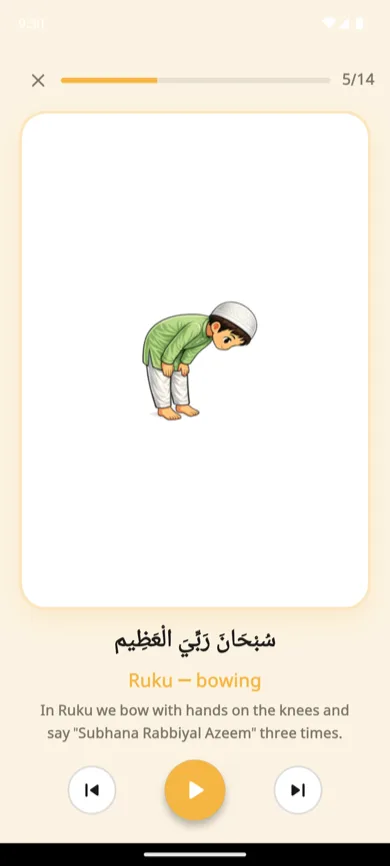
- Ruku: bowing, with Subhana Rabbiyal Azeem (phrase from age 5).
- Sajda (sujood): prostration, with Subhana Rabbiyal A’la (phrase from age 5).
- Jalsa: sitting between the two sajdas.
- Tashahhud: sitting to recite At-Tahiyyat (shown from age 7).
- Salam: turning the head right, then left (shown from age 6).
- Dua: asking Allah after namaz.
The module also names the five daily prayers: Fajr, Dhuhr, Asr, Maghrib and Isha. Ages are KidSpin’s default filters; a parent can show every card in Settings. The namaz guidance follows a Hanafi approach and introduces the prayer; check details and full recitation with your family's teacher.
Wudu (wazu) for kids
KidSpin’s wudu card explains it in one line a young child can follow: before namaz we make wudu, washing the hands, face and arms, wiping the head, then washing the feet so we are clean for prayer. Use it as a picture prompt beside the sink and show each step yourself; a teacher or family elder can add the details your family follows.
What is inside the namaz module?
- Prayer names: Fajr, Dhuhr, Asr, Maghrib and Isha, with simple descriptions.
- Wudu introduction: a picture and short explanation to discuss before prayer.
- Illustrated positions: standing, bowing, prostration and sitting, with English and Urdu labels.
- Selected Arabic phrases: short excerpts appear for older children. These cards do not replace complete salah instruction.
- Gentle picture checks (KidSpin 1.0.5): after a qiyam, ruku, sujood or jalsa card, your child can answer “Which picture shows ruku?” by tapping one of a few posture pictures. A correct tap earns the sticker. Recitation and the full prayer are never graded, and the other namaz cards still count when viewed.
- Namaz order game (KidSpin 1.0.5): your child puts three or four step pictures in the right order, for example qiyam, then ruku, then sujood. The order comes from the lesson cards themselves. Version 1.0.5 is rolling out on Google Play in October 2026.
The guidance follows a Hanafi approach. Ask your family’s teacher about the full sequence, recitation and any differences in practice.
A five-minute namaz activity at home
- Choose one picture. Ask your child what they notice about the position.
- Say its name together. For example, point to the qiyam card and practise the word for standing.
- Demonstrate gently. Show the position yourself and let your child join if they want to.
- Finish with one familiar phrase. Model pronunciation yourself or with your teacher. Return to the same card another day.
This is a suggested family activity. It makes no religious ruling about age, and a child who knows the pictures still needs practice with you to pray on their own.
At what age should children start namaz?
A hadith in Sunan Abi Dawud (495) tells parents to teach children to pray at seven. Many families begin earlier, letting a 3 to 6 year old watch, copy the positions and learn their names. KidSpin’s picture cards suit that early stage. Our guide on what age to start namaz covers each stage, and teaching namaz step by step gives a home routine.
Connect namaz with everyday Islamic learning
Explore daily duas for kids, the six kalimas and Islamic basics in the same app. You can also practise Urdu letters and finger tracing.
Urdu alphabet practice teaches Urdu letters; it is separate from learning Quran reading and tajweed.
Questions parents ask
At what age should a child start learning namaz?
Many families start with pictures and copying a parent at ages 3 to 5. A well-known hadith tells parents to instruct children to pray when they are seven (Sunan Abi Dawud 495); ask your own teacher how your family applies it. KidSpin shows the positions from age 3, adds short Arabic phrases from age 5, salam from age 6 and tashahhud from age 7. A parent can show every card.
Bachon ko namaz ka tarika kaise sikhayen?
Ek waqt mein ek qadam. Show one picture a day, such as qiyam or ruku, say its name together and do the position yourself so your child can copy it. Pray next to your child, keep it to a few minutes, and come back to the same picture the next day. KidSpin's namaz cards give you the pictures and labels in English and Urdu.
Does KidSpin teach the complete salah recitation?
No. KidSpin introduces wudu, illustrated prayer positions and selected short Arabic phrases. It does not provide every recitation needed for a complete salah. Practise with a parent or qualified teacher.
Which prayer approach does KidSpin follow?
The namaz guidance follows a Hanafi approach. Families following another school should check the details with their own teacher; the app does not cover differences between schools.
Is the audio a human Quran reciter?
No. Read-aloud uses the phone’s text-to-speech voices. Quality and offline availability depend on the installed Urdu, English and Arabic voices. A parent or teacher should model and check Arabic pronunciation.
Can children use the namaz lessons offline?
The lesson content is bundled with the app. Read-aloud needs a compatible voice installed on the phone. Installing voices, downloading the app, purchases and licence checks may need internet.
Try one namaz picture with your child.
Start with the free modules on Android. No ads or child account.
GET IT ONGoogle Play