How KidSpin works
A parent’s guide in six steps · Updated 19 October 2026
Start together: install the app, choose an age, open Today’s Path, try a spoken card, play a game and review the completion stickers. KidSpin is designed for ages 3–7, with English and Urdu activities.
Step 1: Install and open
Download from Google Play. There is no sign-up or login. The free app includes 14 categories, 16 English/Urdu picture books and seven games. The optional Bonus Pack adds 10 categories; see current pricing.
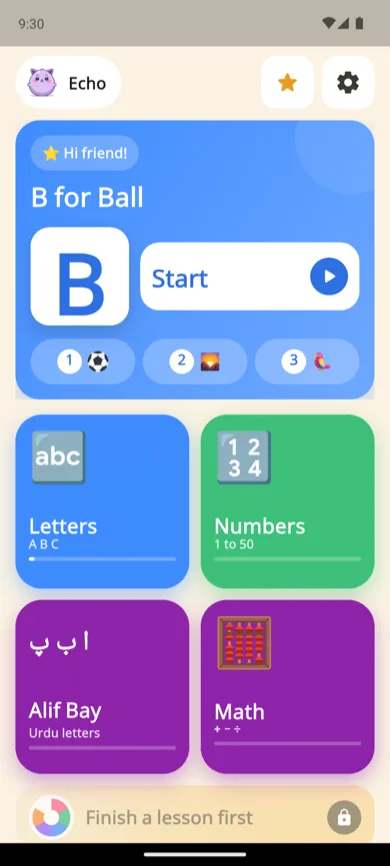
The home screen
Today's lesson front and center, module tiles below. This is what your child sees every day.
Step 2: Pick a language and an age
Setup is two quick questions: English or Urdu, then an age from 3 to 7. Ages 5 to 7 then get an optional short listening game, with a Skip button, that finds a starting point. The next day a small grown-ups card asks for your child’s name and whether you want reminders. The age filter helps narrow the available topics; it is not an assessment of your child’s abilities. You can adjust it in Settings, show all modules or hide topics. Settings asks a simple addition question meant for grown-ups; an older child may be able to solve it.

Two questions at setup
Language and age in, age-appropriate content out. Change either any time in Settings.
Step 3: Open Today’s Path
Today’s Path offers three activities: a foundational topic, a character topic and a discovery topic. Completion progress helps determine what comes next, and an unfinished activity can return. You can also explore the available categories.
A sticker records one correct answer. Repeat an idea together if it is still unfamiliar.
In KidSpin 1.0.5 (available on Google Play since 14 October 2026), a new letter or number card ends with a small “tap the one you hear” check, and the step is done only after a correct answer. A learned item comes back for a quick review one, three and seven days later. For ages 3–4 the home switches to big picture tiles: the first tap says the name, the second opens it.

Progress at a glance
Check marks fill as lessons finish. The Spin wheel opens after today's lesson — play follows learning.
Step 4: Tap a card and test the voices
Tap to hear the card’s text. Spoken playback uses the phone’s synthetic English or Urdu text-to-speech voice, rather than recorded native-speaker audio. Available voices and pronunciation vary by device.
Install compatible voices before relying on sound. For offline use, test playback in airplane mode. For Arabic prayer pronunciation, use a trusted teacher or a verified recitation recording alongside the text.
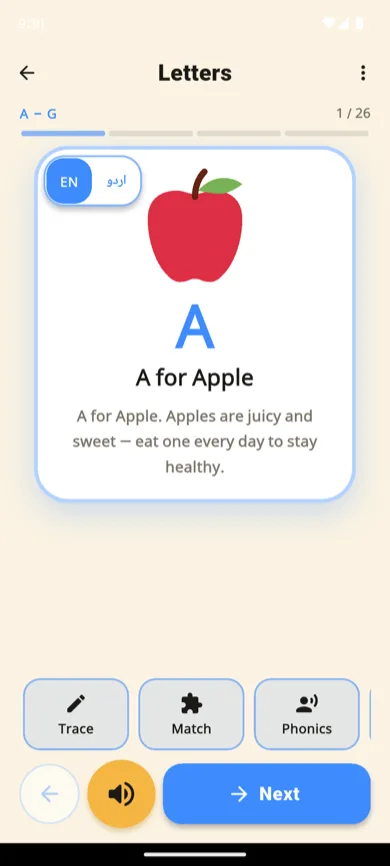
A lesson card
Tap to hear "A for Apple". The اردو button switches language instantly.
Step 5: Choose a game
The seven games include tracing, picture matching, phonics blending, counting, colour selection, animal sorting and putting namaz steps in order. Try one that relates to the card you just explored. Then repeat it away from the screen: trace on paper, count spoons or find the same colour in the room.

Guided tracing
Stroke 1 done, stroke 2 guided by the green dot and chevrons. Real stroke order — English letters, digits, and alif bay pay.
Step 6: Review completion stickers
Stickers and Today’s Path check marks celebrate activities your child finished. They record participation. Use them as a conversation starter rather than a skill score. Ask your child to explain or show an idea in another setting to decide what to revisit.
From version 1.0.5 a sticker means your child answered a small picture check correctly, on the first or second try. It is a light practice check. A parent Progress report shows what each child learned per module, their streak and the last seven days of Today’s Path.
What changes in KidSpin 1.0.5?
KidSpin 1.0.5 adds sibling profiles, a daily time limit per child, a parent progress report and a hands-free Listen mode for stories and duas. Up to four children can share one phone, each with their own stickers and streak. Nothing needs an account, and names and ages stay on the phone. It is rolling out on Google Play and may take a few days to reach your phone.
- Children (sibling profiles): in Settings, add up to four children with an optional first name, an age and a picture. With two or more, the home asks “Who’s playing?” once per launch. Each child has their own stickers, streak, lessons and favourite topics.
- Daily time limit: choose Off, 15, 30, 45 or 60 minutes. Only time on learning screens counts, it resets at midnight, and each child gets the full allowance. When time is up your child sees “See you tomorrow!”. Behind the grown-up question you can add 15 minutes or lift the limit for the rest of the day.
- Progress report: what your child learned per module, new items this week, their streak and the next lesson. You can share a summary through your phone’s share menu; KidSpin uploads nothing.
- What KidSpin knows: a plain-words panel covering ads (none), analytics (none), account (none), where progress is kept, what happens to Echo audio, the optional unlock-code check and Google Play purchases.
- Listen mode: tap Listen on a story or on the duas and the app reads it aloud, turning pages by itself. The screen stays on only while it plays. Listening gives no stickers.
- Placement for ages 5–7: an optional short “tap the one you hear” game for letters, numbers 1–20 and Urdu letters. Only first-try correct answers count, and each module stops after two misses in a row.
- Talk-together questions: one open question per lesson and story for you and your child, such as “What would you do?”. There is no right answer, and you can switch them off in Settings.
- Favourite topics: your child can pick one or two fun topics (dinosaurs, birds, body parts or animals) for the third step of Today’s Path. Other topics still appear on some days.
- Gentle picture checks for namaz and duas: “Which picture shows ruku?” for four prayer postures, and “When do we say this dua?” for five situation duas. Kalmas and recitation are never quizzed.
What parents control
- Topics and age filter: choose what appears in Settings.
- Language: switch English and Urdu where offered.
- Microphone: Echo is optional; other activities work without microphone access.
- Purchases: the Bonus Pack is optional. Keep store purchase authentication enabled.
- From 1.0.5: children (up to four), a daily time limit, the progress report and talk-together questions, all in Settings behind the grown-up question.
Common questions
Does KidSpin work offline?
Lessons, picture books and games are bundled in the app. Spoken playback needs a compatible English or Urdu text-to-speech voice installed on the phone; test it in airplane mode before relying on offline audio. Purchases, restores and periodic license checks need a connection.
How long should a session be?
Choose a stopping point with your child before you begin, such as one letter and one game. Stop sooner if they lose interest. An app session should fit around sleep, play, conversation and your family’s screen-use plan; KidSpin does not prescribe a healthy daily dose.
Can my child use Urdu?
Yes. KidSpin includes a 39-letter Urdu alphabet primer with picture words and tracing, alongside English ABC. It is an Urdu qaida, not an Arabic or Quran Noorani Qaida course. Spoken playback uses the phone’s synthetic text-to-speech voices, not recorded native speakers.
How do I see what my child completed?
Today’s Path uses completion progress to choose three activities. An unfinished activity can return. Stickers and check marks record activity completion; they do not test or certify that your child has learned a letter. Ask your child to recognise it in a book or try it on paper. From version 1.0.5, a parent Progress report in Settings shows what each child learned per module, their streak and the last seven days.
Try KidSpin free on Google Play
Related: Why we built it · Safety and privacy · Parent guides