What makes a preschool app actually teach?
A widely cited review in Psychological Science in the Public Interest (Hirsh-Pasek et al., 2015) found that apps teach young children when four things are true: the child is actively doing something (not just watching), stays engaged with the lesson rather than distracted by rewards, the content is meaningful and linked to real life, and there is some social interaction. Most "educational" apps fail on the second point: pop-up ads, coins and loud rewards pull attention away from the lesson.
Here is how KidSpin handles each one:
- Active: the child traces letters with a finger, blends sounds (V-A-N → van), counts and taps answers. Nothing plays on its own for long.
- Engaged, not distracted: no ads, no coins, no in-app shop. Correct answers get a short confetti burst and a spoken "well done", then the next step.
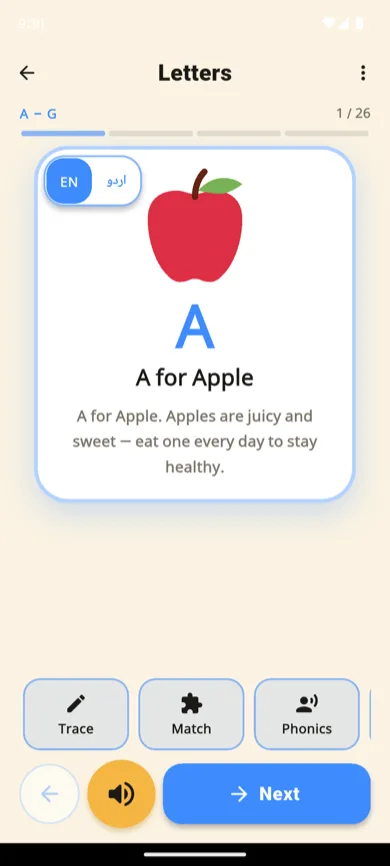
- Meaningful: every letter has a picture word (A for Apple, ب for بطخ) and a short sentence about everyday life.
- Social: Echo, the talk-back friend, repeats what your child says in a funny voice, which gets most children talking out loud. Sitting with them for the first sessions helps even more.
What does KidSpin teach at each age?
You set your child's age once. KidSpin then hides content that is too hard, and a parent switch shows everything if you'd rather choose yourself.
| Age | What they'll mostly do |
|---|---|
| 3 | Letter names and sounds with picture words, counting 1-10, colours, shapes, animals and their sounds, short stories read aloud |
| 4 | Finger tracing of capital letters with stroke order, match games, counting objects, first Urdu letters if you use them |
| 5 | Phonics blending of three-letter words, numbers to 50, simple adding and taking away, the full A-Z and qaida |
| 6-7 | Times tables, harder maths, longer stories, and namaz steps and the six kalmas with meaning |

How a day in KidSpin works
Today's Path gives three short steps: one letter or number, one good-manners or faith lesson, and one fun topic such as dinosaurs or birds. The next letter unlocks only after your child has learned the current one, which is how mastery learning works (Bloom, 1968) and how a nursery teacher moves through the alphabet. If a step is not mastered, it comes back tomorrow; that is on purpose.
After the path, your child can explore anything: Spin to learn picks a surprise lesson, and the story shelf has 16 short comic books in English and Urdu.
Where KidSpin is not the right fit
- iPhone and iPad: not available yet.
- Deep English reading: if you only need English and want the biggest library, Khan Academy Kids has far more content. Many families use both.
- Colouring and drawing: KidSpin has no colouring module.
More options, compared honestly: Khan Academy Kids alternatives and best free preschool apps in 2026.
Questions parents ask
What is a good learning app for a 3 year old?
Look for an app with no ads, no reading required (every word spoken), big buttons and one idea per screen, and a clear order of lessons. KidSpin was built to those rules: a 3-year-old taps a card, hears "A for Apple", then traces or matches it. Khan Academy Kids is another strong free option.
Is KidSpin only for Muslim or Pakistani families?
No. The Islam, Namaz and Duas modules can be switched off in Settings under "Choose what your child sees". What remains is an English preschool app: phonics, tracing, numbers, maths, animals, colours, shapes, dinosaurs and stories.
How long should a preschooler use a learning app each day?
The WHO and the American Academy of Pediatrics suggest about an hour of quality screen time a day at most for ages 2 to 5, ideally with a parent nearby. KidSpin's daily path is designed to finish in about ten minutes.
Does KidSpin work on iPhone or iPad?
Not yet. KidSpin is Android only (Android 7.0 and newer) through Google Play. An iOS version is planned.
Is KidSpin free?
Yes, with no ads. The free app has 14 learning modules, 16 story books, six games and Echo. An optional Bonus Pack adds 10 more modules.
